A good study break lasts about 5 to 10 minutes after every 25 to 50 minutes of focused work. After about two hours, take a longer break of 20 to 30 minutes. A 2022 meta-analysis found that breaks of up to 10 minutes reliably lift energy and reduce fatigue. Studies of students also suggest that planned breaks, plus an occasional longer rest, keep concentration up better than pushing on.
No study has found one perfect number, so treat these as starting points rather than rules. This guide covers what the research actually shows about short breaks, why the long break matters more than people think, what to do during a break so it really helps, and whether you should plan breaks or take them when you feel tired.
How long a study break should be
A useful rule of thumb is a break about one fifth as long as the study block before it. In a 2023 study of university students, the Pomodoro group took 6 minutes off after every 24 minutes of study and the second group took 3 minutes after every 12, so both used the same 1:4 split. The 2022 meta-analysis by Albulescu and colleagues concluded that short breaks of close to ten minutes efficiently reduce fatigue.
| Study block | Short break | When to take a long break |
|---|---|---|
| 25 minutes | 5 minutes | after 4 blocks (about 2 hours) |
| 50 minutes | 10 minutes | after 2 blocks (about 2 hours) |
| 90 minutes | about 20 minutes | the break already counts as long |
Shorter blocks suit hard or unfamiliar material, and longer blocks suit work you can settle into, such as writing or problem sets. Our guide to 25/5 vs 50/10 compares the two most common setups.
What research says about short breaks
Short breaks clearly help you feel less tired, but on their own they don't guarantee better results on hard tasks. The Albulescu meta-analysis pooled 22 samples with 2,335 people and defined a micro-break as a pause of no more than 10 minutes. It found small but significant effects: more vigor (energy) and less fatigue. The overall effect on performance was not significant, and for cognitively demanding tasks the authors wrote that short breaks did not seem to change what came after.
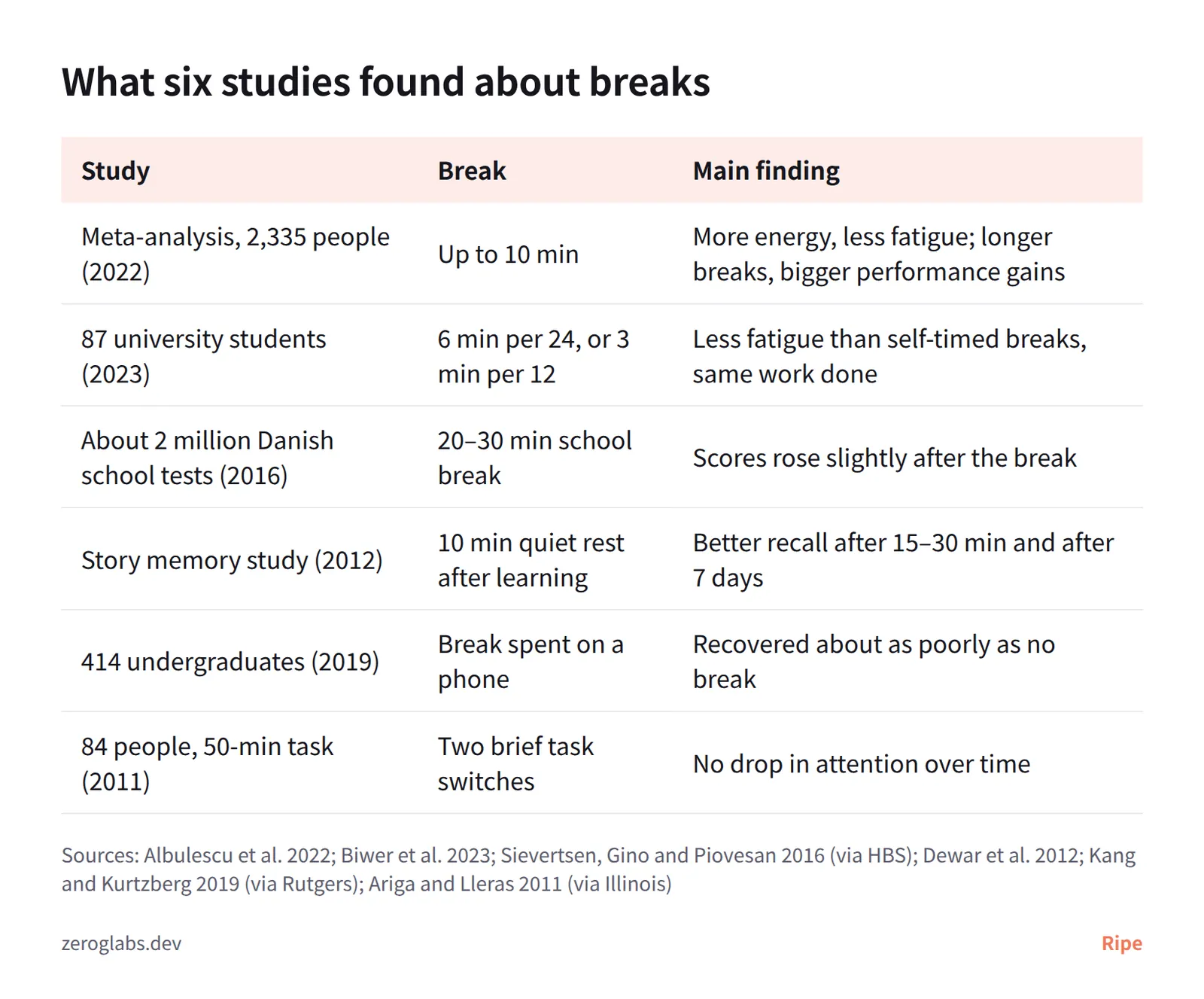
Breaks may also help in a different way: by stopping your attention from drifting. In a University of Illinois experiment, 84 people did a repetitive computer task for about 50 minutes. Most got worse over time, but the group that briefly switched to another task twice did not. Lead researcher Alejandro Lleras advised students facing long tasks, such as revising for a final exam, to impose brief breaks on themselves. The task was a lab test, not real studying, so take it as a sign that short pauses help rather than as proof.
Why the long break matters
The longer break is where most of the recovery happens on demanding work. In the same meta-analysis, longer breaks predicted bigger performance gains, and the authors concluded that recovering from highly depleting tasks may need more than 10 minutes.
A large Danish study points the same way. Harvard Business School reports that researchers looked at about 2 million national test results from children aged roughly 8 to 15. Scores fell from 8 a.m. to 1 p.m., and showed slight bumps after the school's 20 to 30 minute breaks. The lowest-performing students gained the most from those breaks.
In practice, after about two hours of study, take 20 to 30 minutes off. Eat something, get outside or do something unrelated. Then set a timer so the long break doesn't quietly turn into an hour.
What to do during a study break
What you do in a break matters as much as how long it lasts, and the clearest finding is to leave your phone alone.
- Skip the phone. In a Rutgers study, 414 undergraduates solved word puzzles with a break halfway through. Those who spent the break on a phone took 19% longer on the rest of the task and solved 22% fewer problems than the other break groups combined. They recovered about as poorly as people who had no break at all.
- Step away and move. The Albulescu review couldn't single out one best activity, and concluded that for well-being any activity that takes you away from the task seems to work. Francesca Gino, one of the Danish study's authors, suggests short breaks outside, ideally in a park, instead of eating at your desk.
- Rest quietly after learning something new. In a 2012 study, people who rested quietly while awake for 10 minutes after hearing a story remembered more of it 15 to 30 minutes later, and a week later, than people who played a spot-the-difference game. Sitting still with your eyes off the screen for a few minutes is a reasonable use of a break after a dense chapter.
One safety note: breaks help with ordinary tiredness but can't make up for missing sleep. If you feel exhausted most days or can't concentrate for weeks at a time, talk to a doctor or your school's health service.
Scheduled breaks or breaks when you feel tired
Planning your breaks ahead seems to work better than waiting until you feel you need one. In Biwer and colleagues' 2023 study, 87 Dutch university students spent a real self-study day under one of three rules: 24 minutes of study with 6-minute breaks, 12 minutes with 3-minute breaks, or breaks whenever they chose.
Students who chose their own breaks studied in longer stretches and took longer breaks. They also reported more fatigue and distraction, and less concentration and motivation. All groups got about the same amount done, which the authors read as planned breaks being more efficient: similar work in less time. The study was small and ran for one day, but it suggests a timer helps, because people tend to notice tiredness late. For more ways to plan sessions around exams, see our guide to the Pomodoro technique for studying.
Setting your break lengths in Ripe
If you want a timer that handles this for you, Ripe, the Pomodoro focus timer we make for Android, has focus, short break and long break phases, with the long break coming every few rounds. You can pick 25·5, 50·10 or 90·20 in one tap, or set the focus and break lengths yourself.
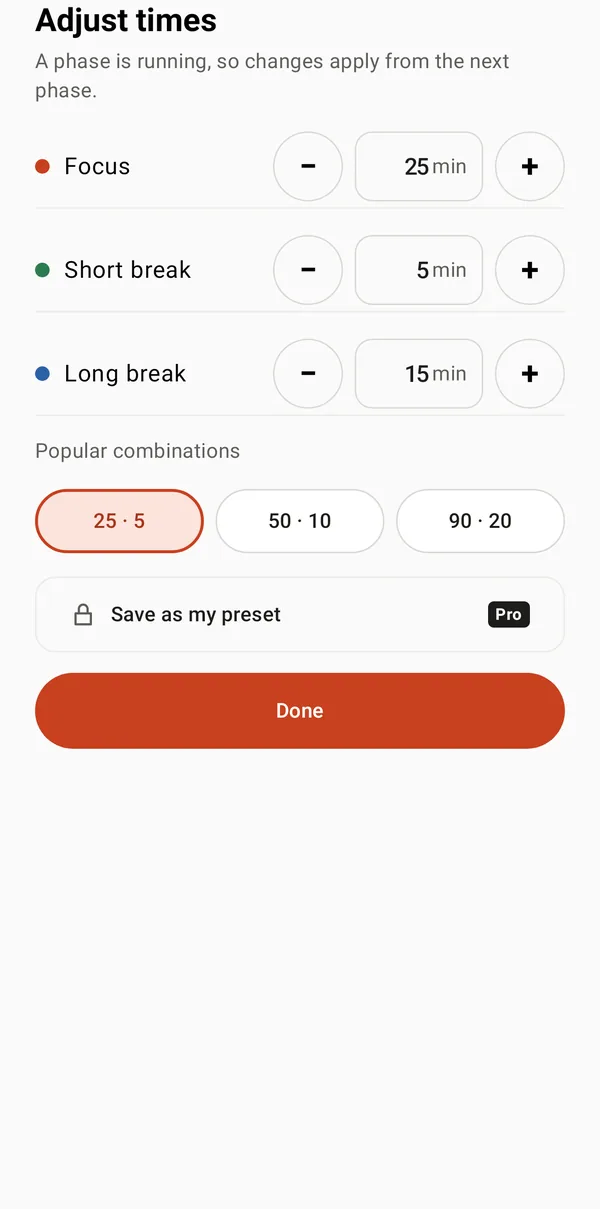
Each phase ends with an exact alarm, so it rings on time even with the screen off. With auto-start on, the next phase begins without you having to touch the phone, which helps you keep it out of reach during breaks. A free 1-minute warning tells you a break is about to end, so you can wrap up a walk or a snack. From the notification you can add 5 minutes or skip. With a pass, which you earn by watching optional ads, Do Not Disturb during focus mutes interruptions while you study and puts your previous mode back when the session ends.

Common questions
Is a 30-minute study break too long?
Not once every couple of hours. Danish schoolchildren scored slightly better on tests taken right after 20 to 30 minute breaks, and the 2022 meta-analysis found longer breaks went with bigger performance gains. A 30-minute break after every 25 minutes of study, though, would leave little time for the work itself.
How often should I take breaks when studying?
Every 25 to 50 minutes is a practical range, with a longer break after about two hours. In the 2023 student study, breaks every 24 or even every 12 minutes led to less fatigue than self-timed breaks, with the same amount of work done. Pick the block length that fits the task and keep it steady.
Is it bad to use my phone on a study break?
It seems to cancel much of the benefit. In the Rutgers study, students who spent their break on a phone performed about as poorly afterward as students who took no break. Stand up, stretch, get a drink or step outside instead, and check messages during your long break.
Should I skip a break if I feel really focused?
You can stretch a block a little, but don't make a habit of it. Students who timed their own breaks in the 2023 study kept working longer yet felt more tired and distracted. If you're mid-thought, finish the paragraph or add a few minutes, then take the break.
What should I do on a 5-minute study break?
Do something that takes you away from the task: stand up, walk around the room, look out a window or rest quietly. After learning something new, a few minutes of quiet rest may even help you remember it. Avoid starting anything you'll want to keep doing, like a video or a game.