To record yourself sleeping, put your phone on a nightstand about 1 to 2 meters (3 to 6 feet) from your head with its microphone facing you, keep it on a hard surface, silence notifications, and start a sound-activated recorder before you fall asleep. In the morning, listen to the saved clips instead of eight hours of silence. Run a two-minute test first so you know the setup works before you sleep on it.
Sound-activated means the recorder listens all night but saves audio only when it hears something. This guide covers the setup step by step, how to keep the recordings private, and how to review them. A recording lets you hear what happens at night, but it can't diagnose a sleep disorder.
What you need before you start
A phone, a charger and a recording app that keeps running with the screen off are enough for most people. Choose audio if you want to hear talking, snoring or other noises. Choose video only if you also need to see movement, such as getting out of bed, because it takes more setup and the camera has to see in a dark room.
A basic voice recorder works for one night, but it saves one long file. At 128 kilobits per second, eight hours of audio comes to about 460 MB, and finding a 10-second mumble in it is slow. A sound-activated recorder saves short clips, so there is far less to store and listen to. The trade-off is that a very quiet whisper may not trigger it, which is why the test below matters.
Step 1: Place the phone near your head, not on the bed
Put the phone on a nightstand or shelf about 1 to 2 meters from your pillow, with the microphone pointing at your head. That is the setup used in a 2021 study of a snoring app with 19 volunteers. The study did not compare distances, and we found no solid research naming one best distance, so treat this as a starting point and adjust it after your test.
On most phones the main microphone is a small hole on the bottom edge. A few practical rules help:
- Keep it off the mattress. Bedding muffles sound, and a phone on the bed can end up under you or on the floor.
- Leave the microphone uncovered. A case flap, a book or a pillow will dull the recording.
- Move it away from noise. Keep it clear of fans, air vents and open windows. The study's authors wrote that background noises have a great impact on recording, and they removed noise from bed partners, pets and open windows on study nights.
- Use the same spot every night. Nights are easier to compare when the phone hasn't moved.
Step 2: Charge it on a hard surface
Keep the phone on a hard, flat surface and use the original charger or a certified replacement. Never charge it under a pillow or on the bed. The Seattle Fire Department warns against charging under pillows or bedding or on top of beds and sofas. The U.S. Fire Administration says charging on soft surfaces or blocking ventilation increases fire risk.
The U.S. Fire Administration also advises against leaving devices to charge unattended when possible, so you have two options:
- Record on battery. If a test night shows your phone lasts until morning from a full charge, charge it before bed and record unplugged.
- Record plugged in. If it doesn't last, plug it in on the nightstand and route the cord where you can't roll onto it or pull it.
Stop using any phone with a battery that is swollen, smoking, hissing or punctured.
Step 3: Silence everything except the recorder
Turn on Do Not Disturb or flight mode so calls and notifications don't wake you or end up in your clips. The phones in the 2021 study were plugged in and in flight mode.
If your phone is also your alarm, check that setting first. Android's help page says alarms can be blocked or allowed in Do Not Disturb filters, and that on Android 8.1 and below, the Total silence option mutes them.
Do this setup early and leave the phone alone once it is running. The CDC advises turning off electronic devices at least 30 minutes before bedtime, and a recorder doesn't need you looking at the screen.
Step 4: Test the sensitivity for two minutes
Sensitivity decides how loud a sound must be before the recorder saves it. Run this test from your bed with the room as it will be at night, and change one thing at a time.
- Put the phone in its nightly spot and start the recorder.
- Lie still and silent for 30 seconds. A clip saved during this silence means the sensitivity is too high for the room.
- Say one sentence at normal volume, whisper another, and make a snoring sound.
- Stop and listen. If the whisper is missing, raise the sensitivity or move the phone closer. If room noise was saved, lower the sensitivity or deal with the noise.
Listen to the start of each clip too. Some recorders keep a few seconds from before the sound began, called pre-roll, so the first word isn't cut off.
Step 5: Start it yourself and confirm it is running
Start the recording by hand just before you settle down, then check for its notification. Android restricts background apps from starting a microphone service on their own, with exceptions such as the user tapping the app's notification. That is why scheduled recording on Android usually needs one tap on a reminder.
Recorders usually show an ongoing notification while the microphone is in use. If you see no sign that it is running, assume it isn't and start it again.
Keep the recordings private
Audio of you asleep is sensitive, so check where it goes before you install anything. Read the privacy policy rather than the store tagline, and look for clear answers to these questions:
- Is any audio uploaded to a server?
- Do you need an account?
- Are the files included in cloud backups?
- Do ad or analytics tools get access to the recordings?
If you share the bedroom, tell the other person and get their agreement first, because the microphone will pick them up too. In the United States, federal law permits recording when you are a party to the conversation or one party has consented. The Reporters Committee counts about 11 states that primarily require everyone's consent. If you are asleep while others talk in the room, you may not count as a party at all. This is general information and not legal advice, and the rules differ by country and state. The simple approach is to tell everyone who sleeps there and not record if anyone objects.
Delete clips you don't need, and only share the ones you would be comfortable having copied.
How to review the night in the morning
Start with the longest or loudest clips, give it about five minutes, and stop there. Expect noise more than sentences. In a lab study of about 230 adults, 59% of what people said in their sleep was undecipherable: mumbles, shouts, whispers and laughs. Nearly all of those people had sleep disorders that make sleep talking more likely, and only 15 were healthy, so your nights may differ.
Keep a short log so the nights mean something together:
- The date and when you went to bed
- The number of clips, and any that were loud or frightening
- Anything unusual, such as alcohol, sleeping pills or a stressful day
The NHS lists smoking, drinking too much alcohol and taking sleeping pills among the things to avoid if you snore, so those are worth writing down. Record several nights, because one silent night only means you were quiet that night. If you want to know why it happens, we cover the causes in why people talk in their sleep.
Treat any automatic snoring score as rough. In the 2021 study, the app put median snoring at 26.3% of the night, while the medical sleep monitor it was checked against put it at 2.4%. Louder snoring agreed better. That was one app and a small group, but it is a good reason to trust your ears over a number.
Fix problems after the first night
Most first-night problems come down to sensitivity, placement or the recording stopping early. Change one thing per night so you can tell what helped.
| What you find | Likely cause | What to change |
|---|---|---|
| Dozens of clips of hum or traffic | Sensitivity too high, or noise near the phone | Lower the sensitivity and move the phone away from the noise |
| No clips, but someone heard you | Sensitivity too low, or recording stopped | Raise the sensitivity and check that the recorder stayed on |
| Muffled clips | Microphone covered or facing away | Clear the microphone and point it at your head |
| Recording ended early | Battery, battery saver or an end time you set | Charge safely as in Step 2, check battery saver and check the end time |
| Other people or pets in the clips | Shared room | Expect this, and listen for whose sound it is before drawing conclusions |
When to show a recording to a doctor
Talk to a healthcare provider if your clips or your days suggest more than ordinary noise. Sleep talking usually carries little risk, and snoring alone isn't proof of a problem, but these are the signs that health bodies point to:
- Pauses in breathing or gasping. The NHLBI lists breathing that starts and stops, frequent loud snoring and gasping for air as sleep apnea symptoms, along with daytime sleepiness and tiredness.
- Sleep talking that begins suddenly in adulthood, or involves intense fear, screaming or violent actions. Cleveland Clinic advises seeing a sleep specialist in those cases.
- Snoring that affects your life. The NHS suggests seeing a GP if lifestyle changes aren't helping or your snoring has a big impact on you or your partner.
Bring the clips with you. Cleveland Clinic says video and audio recordings of someone sleeping can help a provider, especially when the provider can hear breathing. Its snoring page also mentions using an app or a noise-activated voice recorder to track snoring. A recording is evidence to discuss, not a diagnosis.
Doing this with Murmur
Murmur is the sleep talk recorder we make for Android 8.0 or later, and it follows the setup above. Tap Start sleep, with an optional end time, then turn the screen off and recording continues. It saves a clip only when it hears sleep talk, snoring or other sounds, and it includes the 3 seconds before the sound started so the first word isn't cut off. Sensitivity is adjustable, and no ads show while recording.
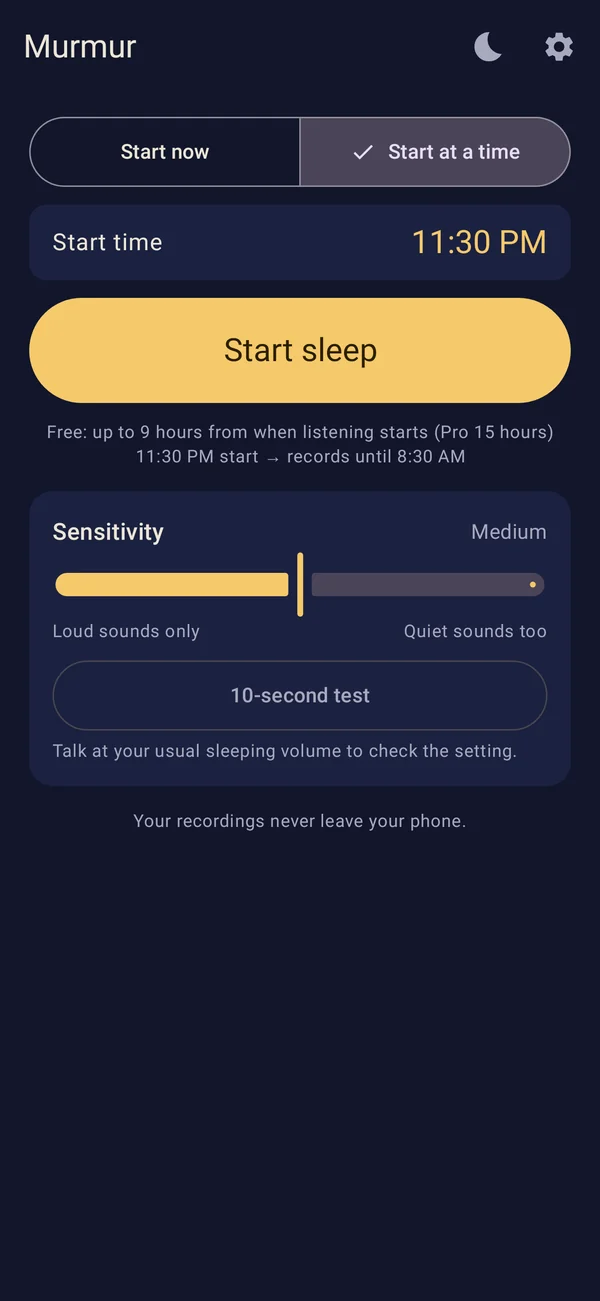
In the morning, a summary notification says how many clips were recorded. Each night has its own timeline with a sound graph, where you can play clips, mark favorites and delete what you don't need. After the night ends, a sound model built into the app sorts clips into talking, snoring and other sounds on your phone. Listening by kind opens with a pass, which you get by watching an optional ad and which lasts 24 hours. Sorting is automatic and some clips may land in the wrong group, so every clip also stays under All.
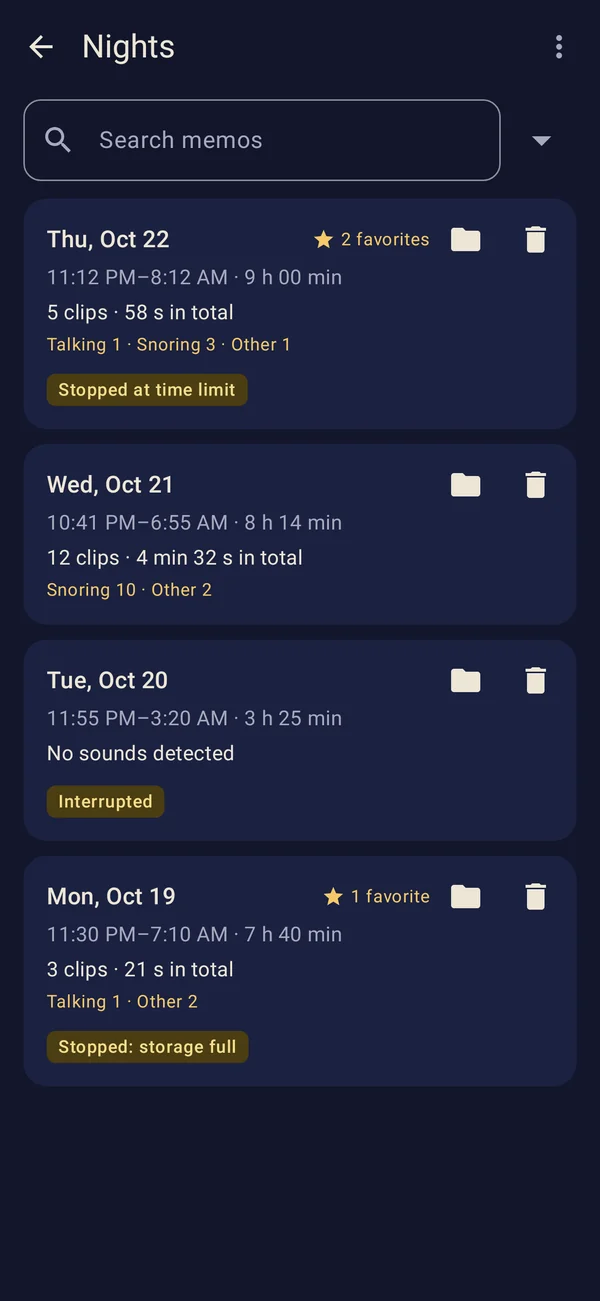
For privacy, no account is needed and recordings stay in the app's private storage. They are never uploaded and aren't included in cloud backups. Murmur uses the internet only to show ads, and ads never get your recordings. That also means uninstalling deletes everything, so export anything you want to keep first, which needs a pass.
The free version keeps your 3 most recent nights and 3 favorites, records up to 9 hours a night, and shows a banner ad at the bottom of the screen when you aren't recording. Schedules work too, with one tap on the reminder before each one.

Common questions
How far from the bed should my phone be?
Start about 1 to 2 meters from your head, on a nightstand, with the microphone pointing at you. One small study of a snoring app used that setup, although it did not test other distances. If your whisper test comes out too faint, move the phone closer, but keep it off the mattress.
Is it safe to leave my phone charging by the bed all night?
Keep it on a hard, flat surface with an original or certified charger, and never on the bed or under a pillow. The U.S. Fire Administration also advises against unattended charging when possible. If your battery lasts the night, charge before bed and record unplugged.
Can I record myself sleeping on video?
Yes, but you need a camera that can see in a dark room and a steady place to put it. Video is worth the effort when you need to see movement as well as hear sound. Cleveland Clinic notes that recordings are especially useful when a provider can hear breathing, so make sure the sound is clear too.
Why did my recorder save nothing?
Either no sound crossed the sensitivity level or the recording stopped during the night. Repeat the two-minute test, check the microphone isn't covered, and check battery saver and any end time you set. A night with no clips can also simply be a quiet night.
Can a phone recording tell me if I have sleep apnea?
No. In the 2021 study, the snoring app did not detect blocked-breathing events, and its authors said it should not be used to screen for obstructive sleep apnea. The NHLBI says you may need a sleep study to help diagnose the condition. A recording can still help you explain what is happening to a provider.
Can I record my partner while they sleep?
Ask first, and don't record if they say no. Consent rules differ by place, and a shared bedroom is a private setting, so secretly recording someone can create legal trouble as well as trust problems. If your partner doesn't agree, record only on nights when you have the room to yourself.